Instance Console Connections
The Oracle Cloud Infrastructure Compute service provides console connections that enable you to remotely troubleshoot malfunctioning instances, such as:
The Oracle Cloud Infrastructure Compute service provides console connections that enable you to remotely troubleshoot malfunctioning instances, such as:
- An imported or customized image that does not complete a successful boot.
- A previously working instance that stops responding.
- Serial console connections
- VNC console connections
In this article I will show how to connnect using VNC.

Click on your Instance Name, in this example "LinuxVM2":

Then clic in "Console Connections", This is at the bottom of the page:

Click in "Create Console Connection":

You have to create the Keys previously, here just upload the "Public Key" by clicking on "Browse". Then click on "Create Console Connection":

Click on the three points you see at the right " . . ." and then "Connect with VNC":

Select the Operating System you are using, in my Case it's windows. Copy the command line and then paste it in a Text Editor (Notepad, for example)

In the Text Editor Replace the value “$env:homedrive$env:homepath\oci\console.ppk” with the Path of your Private Key, in my case is “C:\Users\Deiby\Documents\privateOCI.ppk"
Now we have to run the new Command line in "PowerShell":

Paste it in PowerShell and you will have to type "y" when it asks you. Once done a Tunel has been created and now youcan connect using VNC.
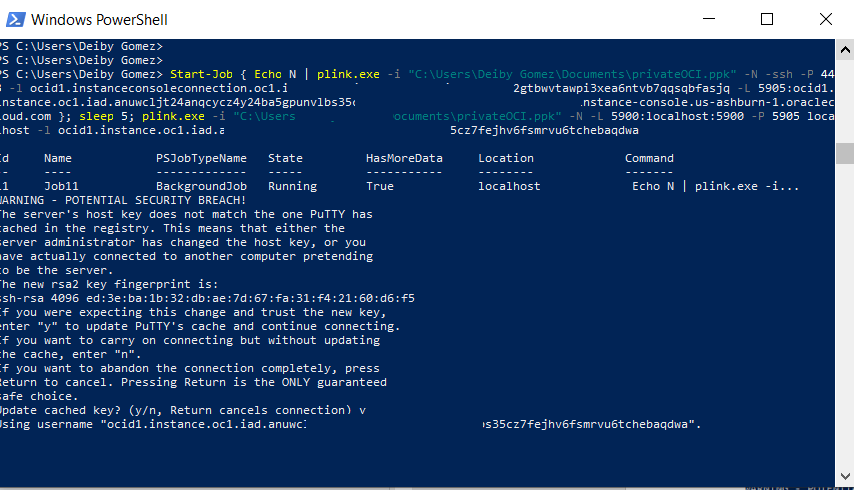
To connect with VNC, just use "localhost:5900"

Now you can see what's going on in the Console, this console is persitent to reboots of the Instance, that's why you can use to fix problems.